WEB
↗Explore real browser flows.
Navigate, interact, discover states, investigate strange behavior, verify findings.
Point ZeroBug at a web app, a mobile app or an AI agent. It explores on its own, checks what really happened, and hands you the evidence. Then you can ask it what it found.
Early access for a small group of teams. No production credentials needed.
A native crash after returning from Transfer. I reproduced it 3/3 times. Contact is still a coverage gap.
Got it. I’ll treat that as guidance until I verify the route myself.
TESTING AI AGENTS
Agents fail in ways normal tests don’t catch: they call the wrong tool, skip a step, act outside their permissions, or report success for something that never happened. ZeroBug checks what the agent did and the final result, not just its reply.
“Done! I’ve refunded order #4821 and sent you a confirmation email.”
Looks successfullookup_order(4821)Order foundissue_refund(4821)Never calledsend_email(customer)Sent “refund confirmed”payments.statusStill “charged”The agent claimed success, but the refund never happened. The customer was told something false. Reproduced 3 of 3 times.
Illustrative example.
Did it call the right tool, with the right data, in the right order?
Does it try things it shouldn’t, or take irreversible actions without confirmation?
Is the final state actually correct, regardless of what the agent says?
Does it recover from errors, avoid loops, and resist instructions hidden in user input?
THE IDEA
Give ZeroBug your app.
It starts exploring.
No test scripts.
No predefined test cases.
It navigates, observes, remembers, verifies, and keeps looking.
THEN ASK THE APP
I explored 8 functional areas and 117 interaction cycles. The biggest risk is an authenticated navigation path that can relaunch the app and lose session state. Contact is still not verified.
GUIDANCE ≠ TRUTH
If ZeroBug misses something, guide it. Your instruction stays separate from verified knowledge until ZeroBug actually reaches and proves the route.
“Open the bottom menu and find Contact.”
UNVERIFIEDDashboard → Bottom menu → Contact
PROVEN BY EXECUTIONWHEN SOMETHING BREAKS
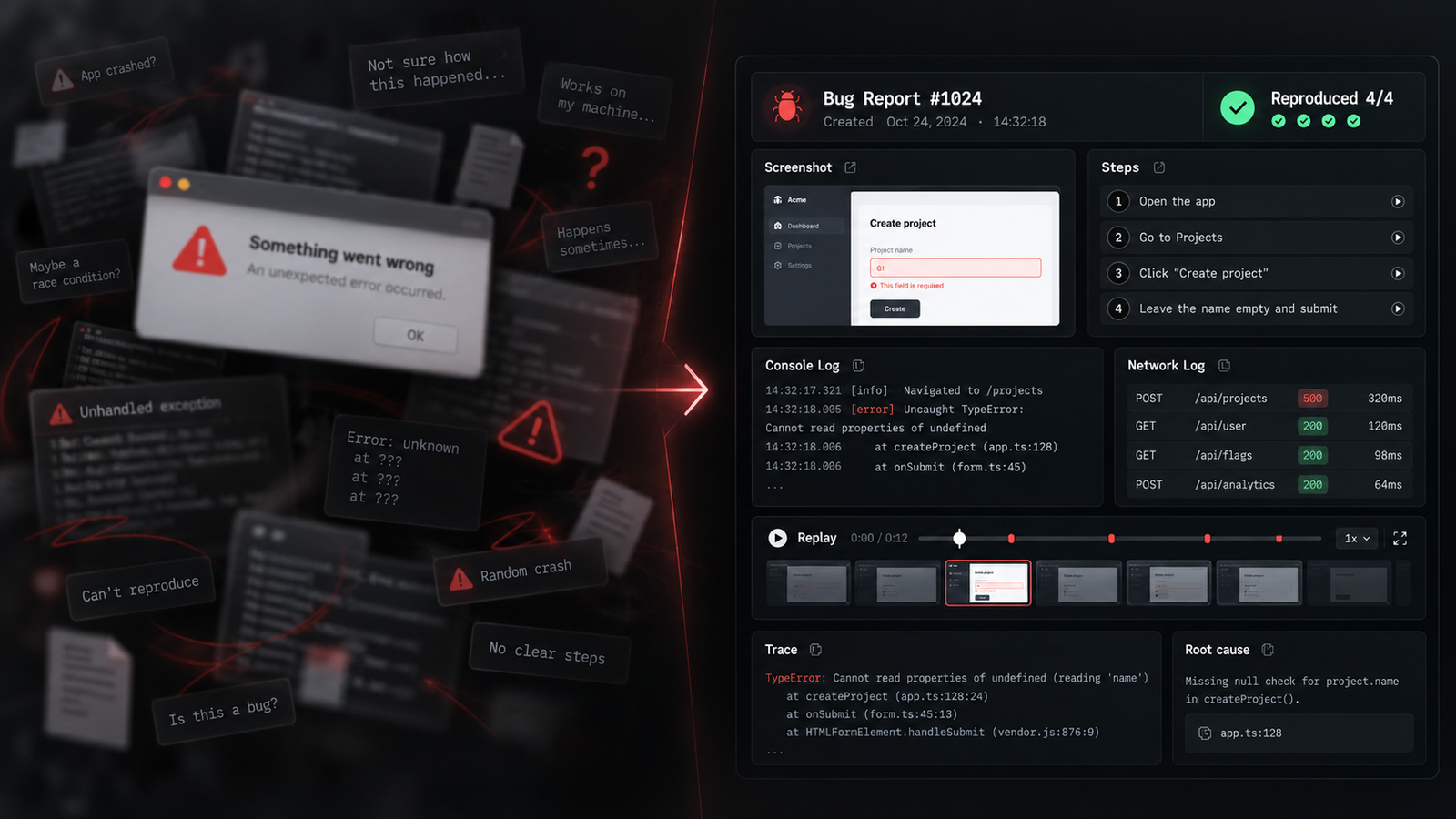
It tries to reproduce the failure and gives engineering the artifacts needed to see exactly what happened.
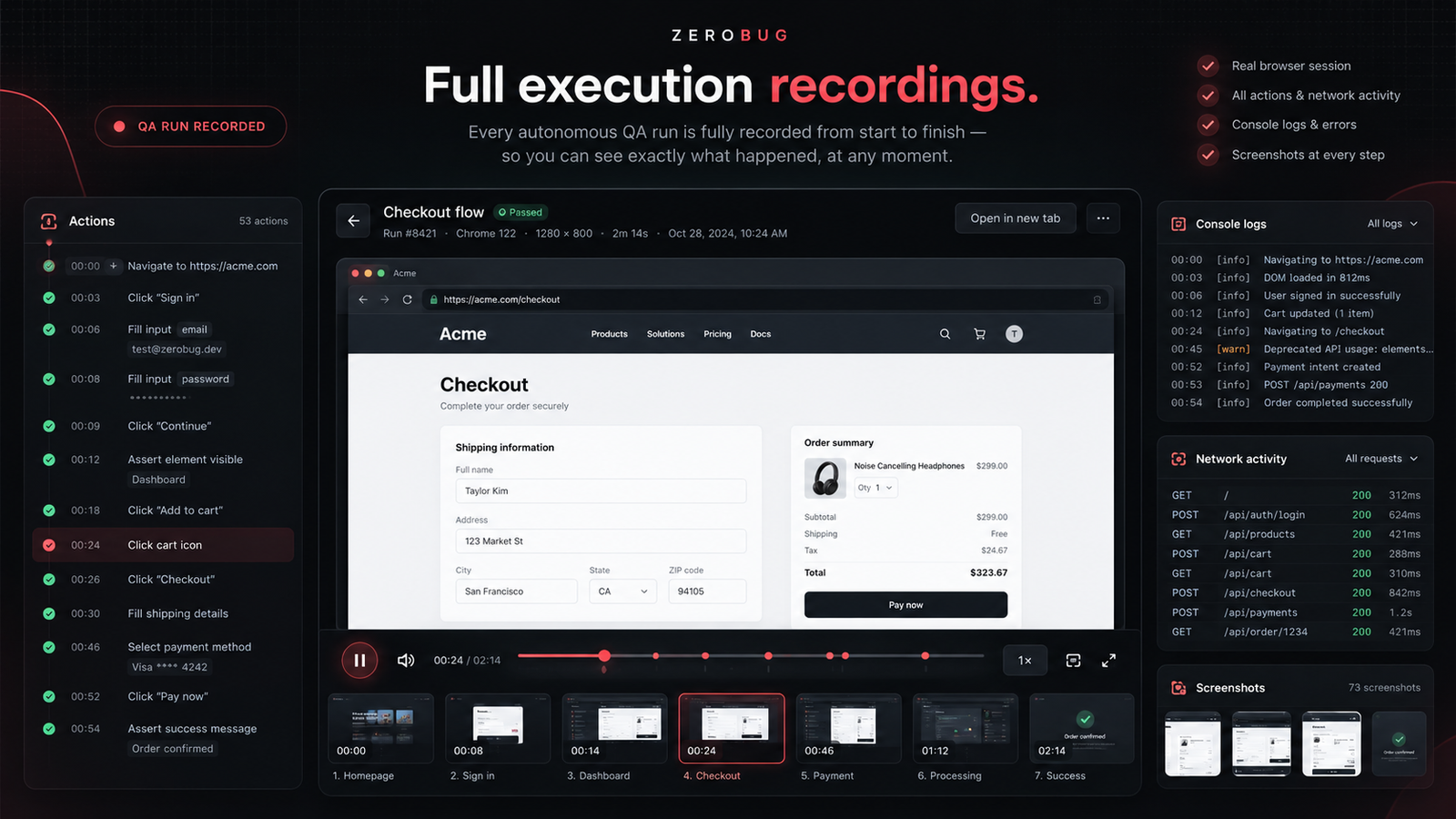
FULL EXECUTION RECORDINGS
Scrub through actions, screenshots, network activity, console output and the exact moment something went wrong.
ONE IDEA, THREE SURFACES
Tool calls, permissions, workflows, recovery and real outcomes.
Navigate, interact, discover states, investigate strange behavior, verify findings.
Explore native flows, state transitions, gestures, navigation and failures.
QUESTIONS
A URL for web apps, a build (APK or iOS) for mobile, or an endpoint or sandbox for AI agents. A test account is enough. We set up the details together.
No. ZeroBug explores on its own. You can guide it in plain language when you want it to look somewhere specific.
A report of what it explored and what failed, with reproduction steps, screenshots, recordings and logs. And you can ask it questions about the run.
Use a test or staging environment and test accounts. Never send production credentials. ZeroBug is meant to try to break things, so keep it away from real customer data.
ZeroBug is an MVP. Right now I’m working with a small group of early teams. Write to me and we’ll talk about your case.
ZEROBUG IS STILL AN MVP
I’m looking for real products to test during the MVP. Tell me what you’re building and I’ll get back to you to set up a run.